The Least Powerful Executor: A Model for Automation with Agents
How to choose the simplest automation layer that can reliably do the job

This article complements Bassim Eledath’s The 8 Levels of Agentic Engineering, which describes how agent systems grow more capable over time, from assistant-style workflows to increasingly autonomous systems.
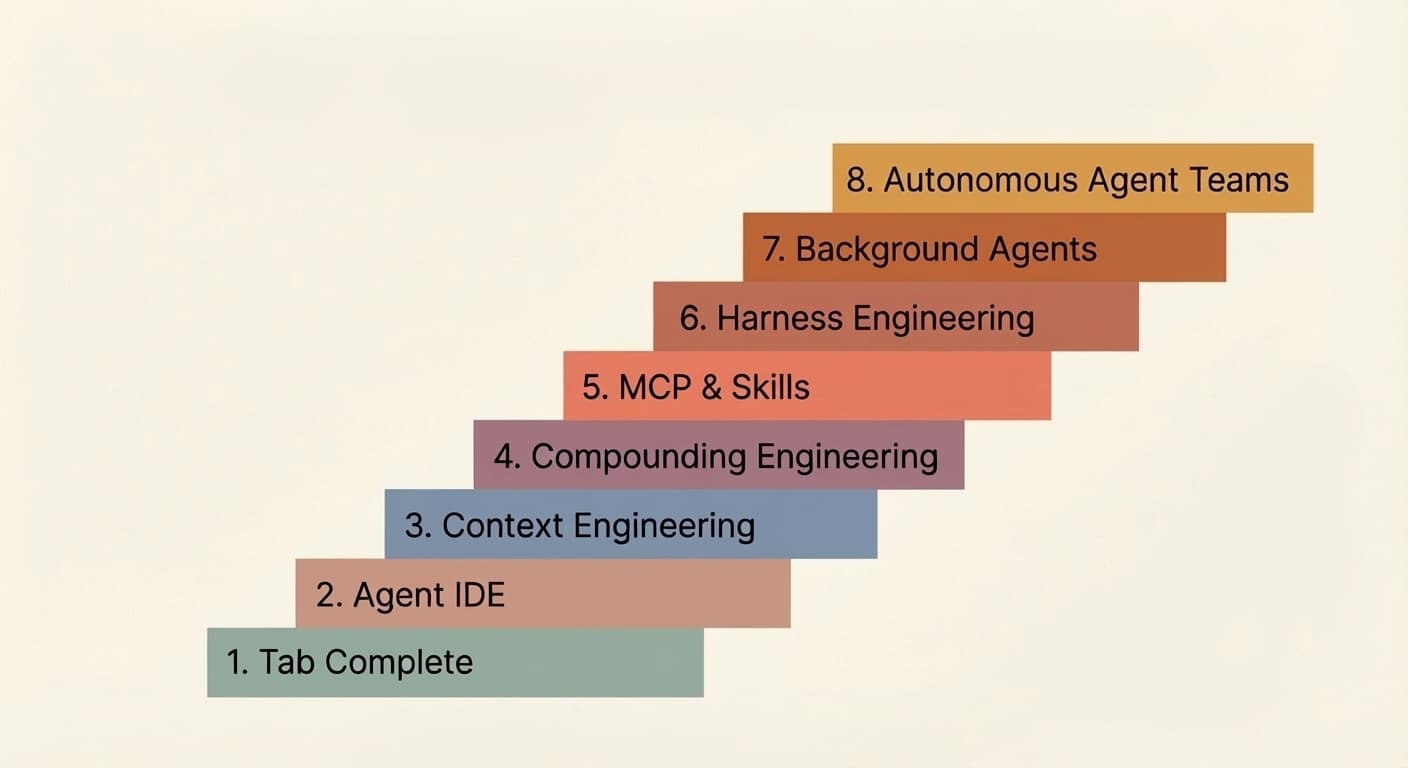
The focus here is on a different dimension entirely: not how agents mature, but how they execute.
This is an execution model, not a maturity ladder.
Working thesis
Use the least powerful executor that can reliably complete the task within a declared scope and authority.
Keep verification as a separate completion gate.
Even when changes are made automatically, the final diff should still be reviewed by humans.
What this model is for
This model applies to reusable engineering workflows such as linting, testing, documentation checks, security checks, code generation, and small code repairs.
The goal is to ensure these workflows behave consistently whether they run locally, in CI, inside tool wrappers or LLM harnesses, or as part of long-running agents and multi-agent systems.
This becomes more important as teams start deploying agentic coding automation in production. Without a clear execution model, these systems become harder to reason about, harder to debug, and harder to operate with confidence.
LLMs have made it easier to run commands through natural language, which is valuable for local development and one-off exploration. But workflows that depend on an LLM prompt for each run are less reusable and harder to integrate into broader automation.
More durable value usually comes from turning that interaction into a stable script, adding orchestration on top of it, and eventually enabling agents to operate within a defined framework. Each layer provides a foundation for the next, allowing engineering work to build on itself over time.
Keep the main dimensions separate
A good agent architecture should not collapse everything into one vague “agent level.” Each run should make a few things explicit:
Executor: what actually does the work
A command, a script, an orchestrator, or a coding agent.Authority: what it is allowed to change
Inspect only; suggest a diff without applying it; apply a predefined deterministic transformation; or make bounded semantic edits within explicit constraints.Scope: what it may inspect or modify
A line range, a single file, a directory, a repository, or an explicit set of named files, modules, or artifacts declared in advance.Verification: what evidence is required before the task is done
Lint passes, tests pass, policy checks pass, or human review happens.Outcome: how the run ends
Resolved, partially resolved, failed safely, or awaiting review.
These are distinct dimensions, not a single maturity scale. Each should be specified independently, because each answers a different question about how a run executes.
Keeping them separate makes the system easier to design, reason about, and audit.
The common execution flow
Most engineering workflows can be described in terms of the same basic flow, even if a particular run skips some stages:
Inspect
Understand the current state and gather evidence. Make no changes.Correct
Apply safe and predictable changes that are already approved by project policy.Suggest
Show the exact intended and proposed change before applying it, such as a patch, diff, or generated output.Repair
If deterministic application is not enough, hand off to an agent to make a bounded semantic change within an explicit scope.Verify
Run the required checks and classify the outcome.
Not every domain should permit every stage. Security-sensitive changes, infrastructure changes, database changes, and production-facing operations may require stricter limits, additional verification, or human approval before any write occurs.
Inspection and verification are not the same, even when they use the same tools. Inspection gathers evidence before changes. Verification classifies the outcome. Sometimes that means re-running the same commands. Sometimes it requires a different actor entirely (a human, a review agent, or a separate set of checks).
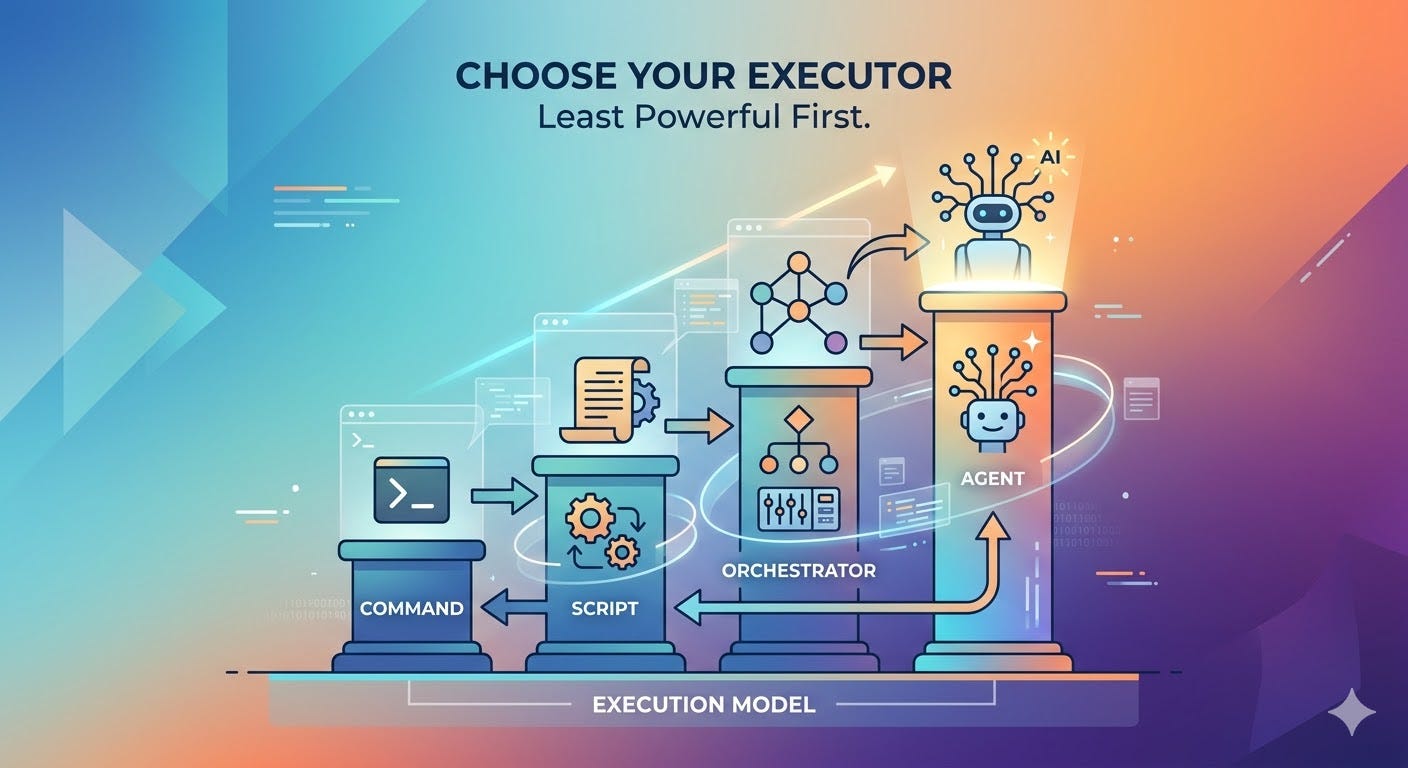
The 4 execution layers
Command
A command is the smallest execution unit in a workflow. It performs one defined action at a time, usually by invoking a single tool or a tightly scoped operation.
Examples:
eslint src/pytest tests/unit/ruff check .git diff --name-only HEAD~1
Script
A script runs one or more commands in a fixed, repeatable way. It provides a stable entry point for routine project behavior.
Reusable workflow logic should generally live in tools and script entry points before it lives in prompts.
Scripts can take many forms: make targets, npm scripts, shell scripts, justfiles, or language-native task runners. The format matters less than the contract: the script should be named, stable, and callable from CI without modification.
Examples:
make lintnpm run testjust check./scripts/validate.sh
Orchestrator
An orchestrator is not just “a script with a fancier name.” It is a layer that makes decisions.
An orchestrator may still be implemented as a script, but its role is different. It can:
choose what to run next based on results
narrow scope to changed files
retry certain steps
collect evidence
stop when policy says to stop
decide whether escalation is needed
hand off work to an agent only when allowed
A plain script says: Run these steps.
An orchestrator says: Run these steps, inspect the results, decide what happens next, and keep the process inside policy.
So the difference is not the programming language or file type. The difference is behavior and responsibility.
Examples:
a Python script that runs
git diff --name-onlyand passes changed files to the lintera GitHub Actions workflow that fans out jobs based on which paths changed
a shell script that retries a flaky step up to three times before stopping
a CI stage that collects test failures across modules and decides whether to escalate to a repair agent
Agent
An agent is an LLM-driven executor that can inspect state, choose actions, use tools, and iterate within explicit bounds.
It should be used only after simpler layers have done what they can.
In practice, that means agents should call stable project tools and scripts whenever possible instead of inventing their own workflow from scratch. If an agent needs to repair code, it should still rely on the normal command and script paths for inspection, formatting, checking, and verification.
Examples:
a coding agent limited to two named files to resolve a failing type check
an agent scoped to one module to replace deprecated API usage
an agent authorized to repair a broken unit test
But where deterministic control is sufficient, a script or conventional orchestrator is usually preferable: it is cheaper, faster, easier to audit, and does not require a model call for every step.
One concrete example: linting
A linter can often inspect code and report issues without making changes. In many cases, it can also suggest or apply predictable autofixes, such as formatting updates, import ordering, or other rule-based changes.
A command can run the linter once.
A script can run the project’s standard lint flow, such as linting plus formatting checks.
An orchestrator can limit that flow to changed files, collect failures, and apply approved autofixes where policy allows.
But linters cannot usually resolve every issue. Some findings require a semantic code change rather than a deterministic fix. That is where an agent may be useful, within an explicit scope and authority, after the standard tools have done what they can.
The standard scripts should then run again, the result should be verified, and the final diff should still be reviewed by a human.
The same pattern applies to tests, documentation checks, and other engineering workflows. The tools change, but the control model remains the same.
Start with commands
Commands should usually be the default starting point.
That is not because commands are automatically safe. It is because they are usually simpler, easier to audit, easier to benchmark, easier to run in CI, easier to reuse, and more predictable than free-form model behavior.
But commands are not safe by default. A destructive shell command can be much riskier than a tightly bounded editing agent.
Safety comes from controls such as narrow scope, previewability, reversibility, verification, monitoring, and human review.
A command proves that a task can be done.
A script turns that task into stable project behavior.
Once a workflow is useful more than once, it should usually exist as a named script or tool entry point that can run the same way locally, in CI, and inside higher-level automation.
From there, orchestration can add control logic such as narrowing scope, retrying steps, collecting evidence, or deciding whether escalation is needed.
An agent should enter only after the normal command and script paths are already in place and deterministic tools still cannot complete the task within policy.
So the rule is not “commands are safe.”
The rule is this:
Start with commands, stabilize the workflow in scripts, add orchestration where needed, and use an agent only for the remaining work that simpler layers cannot reliably handle.
Clear design rules
This model should state a few rules plainly.
1. All changed lines should still be reviewed by humans
Automation can inspect, correct, suggest, repair, and verify. But human review should still be the final control point for changed lines before acceptance.
This does not make automation less useful. It keeps accountability clear.
2. Scripts should use commands
Commands are the base layer. Scripts package them into stable workflows.
This keeps project behavior explicit and testable.
3. Agents should use scripts
Agents should rely on stable project scripts and commands whenever possible.
They should not become the hidden home for core engineering logic.
4. Skills and SDK wrappers still need scripts underneath
Some scripts can be exposed as reusable skills. Some may be wrapped in agentic workflows built with tools such as OpenHands Software Agent SDK or Claude Agent SDK.
But the important point is that the capability still has a script or command path underneath it. The agent-facing wrapper is not a replacement for that foundation.
5. MCP, RAG, and similar tools do not replace scripts
Agents may use MCPs to connect to tools and systems. They may use RAG to fetch documentation, code context, or repository knowledge. They may use memory or retrieval systems to carry context across steps.
But whenever a capability can be implemented as a stable command or script, it should be. MCP should expose that capability, not serve as its only implementation. The execution layer should remain in standard project tools and scripts.
6. You should monitor the system
Once scripts and agents start making changes, you need visibility into what is happening.
Without monitoring, you cannot improve the system or trust it.
Conclusion
The core idea is simple: use the least powerful executor that can reliably do the job.
Commands before scripts. Scripts before orchestrators. Orchestrators before agents. Agents only when the simpler layers have genuinely run out of road.
Build the layers deliberately. Keep them testable, callable, and independent of each other. Verify at every step. Keep humans in the loop on changed lines.
That is how automation compounds.